之前看到網路上很多人都在玩LINE 的LIFF,尤其是看到官方文章這篇,感覺就超級有趣的,想說自己也來寫一個玩看看,因為之前比較少接觸JavaScript,所以花了一點時間研究一下,下面來簡單講一下實作過程吧~
* LIFF(Line Front-end Framework)是一個可以在 LINE app 內運作的 web app 平台,並且浮現在對話視窗中。
* 相關LIFF 官方介紹及可以使用的API文件 => Link
* 除了要會一些python寫Chatbot,還要學一下HTML與JavaScrip一下
Target:
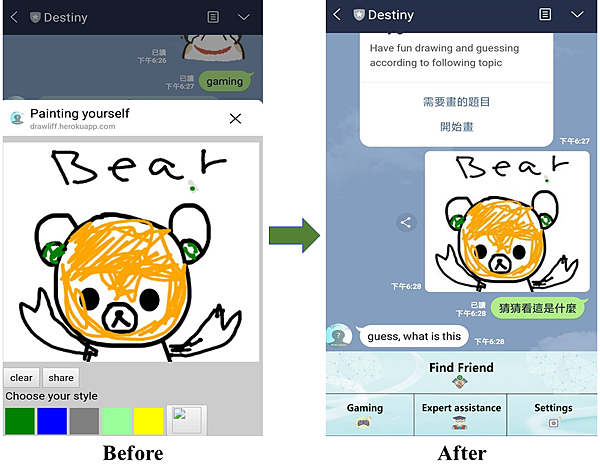
目標是建一個可以畫圖並傳送出來的LIFF,同時想說也順便加上可以即時翻譯的LINE BOT, 練習兩樣功能的實作。最後呈現如下圖,我畫的有點醜請見諒XD
Step:
1. 建立draw連結對象
如果要用LIFF畫圖就要先建立一個可以連結畫圖的網站,所以首先要先用簡單的HTML與JavaScript來架一個給我LIFF畫圖的連結(link),下面先放上我簡單寫的程式碼,很少在寫前端,所以有比較奇怪地方請告知一下。
我的後端是使用用Python的Flask框架,而前段就用HTML + Node.js
下面有幾點要注意一下
* 如果是使用Flask框架的話要注意資料夾的階層位置次序,因為Flask在跑的時候會依照資料夾名稱去抓要使用到的檔案,所以資料夾名稱也要正確才行,templates 與 static 都是相對應於主程式.py的位置,templates資料夾是存放副檔名為.html的檔案 ; 而 static 裡面分別有images 資料夾存放圖片檔案與js 資料夾存放副檔名為.js的檔案。
* 每次在push js檔案上去時候要記得在 <script src="..address...xxx.js?v=138"></script> 裡面更改v=後面的參數(亂打即可),如果沒有更改的話,Chrome還是會去抓之前沒修改過的,我試過刪除cookie還是一樣。
* 把所有檔案都Push到Heroku後,測試過網址沒問題後,就要到Line Developers,找到你要使用的機器人 Channel,點選列表的LIFF,就可以加入了喔~
* 圖片如果要存起來需要另外加入資料庫,我這邊是使用Heroku來暫存,所以畫完的圖過沒多久就會在heroku的路徑上消失了
資料檔案階層結構

draw.js
window.onload = function() {
  var canvas  = document.getElementById('main');
  var canvastop = canvas.offsetTop
  var context = canvas.getContext("2d");
  var lastx;
  var lasty;
  var color = "#000000"
  var width_can = 1;
  context.strokeStyle = color;
  context.lineCap = 'round';
  context.lineJoin = 'round';
  context.lineWidth = width_can;
  function colort() {
		switch (this.id) {
            case "green":
                color = "green";
                break;
            case "blue":
                color = "blue";
                break;
            case "red":
                color = "red";
                break;
            case "yellow":
                color = "yellow";
                break;
            case "orange":
                color = "orange";
                break;
            case "black":
                color = "black";
                break;
            case "white":
                color = "white";
                break;
			case "gray":
                color = "gray";
                break;
			case "lightgreen":
                color = "#99FF99";
                break;
			case "lightblue":
                color = "#99FFFF";
                break;
			case "lighgray":
                color = "#DDDDDD";
                break;
        }
    }

  function clear() {
    context.fillStyle = "#ffffff";
    context.rect(0, 0, 350, 330);
    context.fill();
  }

  function share() {
		$.ajax({
		   type: 'POST',
		   url: '/fileupload',
		   data: {
			 'image': canvas.toDataURL('image/jpeg', 1.0)
		   },
		   success: function (res, status) {
			 liff.getProfile().then(function (profile) {
			   liff.sendMessages([
				 {
				   type: 'image',
				   originalContentUrl: 'https://yourURL......herokuapp.com/static/images/' + res + '.jpg',
				   previewImageUrl: 'https://yourURL.....herokuapp.com/static/images/' + res + '_240.jpg'
				 },
				 {
				   type: 'text',
				   text: '猜猜看這是什麼'
				 }
			   ]).then(function () {
				 liff.closeWindow();
			   }).catch(function (error) {
				 alert('Error sending message: ' + error.message);
			   });
			 }).catch(function (error) {
				 alert("Error getting profile: " + error.message);
			 });
		   },
		   error: function (res) {
			 alert('Error saving image: ' + res.status);
		   },
		   complete: function(data) {

		   }
		 });
       liff.sendMessages([
             {
               type: 'image',
			   originalContentUrl: imgData,
			   previewImageUrl: imgData,
             }
           ]).then(()=> {
             liff.closeWindow();
			});*/

	}

  function showimage(){
	  switch (this.id) {
		  case "bear":
				url = "yor pic url"
				break;
	  }
	  var img = new Image();
	  img.onload = function(){
		 context.drawImage(img, 0, 0, 350, 330);
	  };
	  img.src = url;
  }
  function dot(x,y) {
    context.beginPath();
	context.lineWidth = width_can;
	context.strokeStyle = color;
    context.fillStyle = "#000000";
    context.arc(x,y,1,0,Math.PI*2,true);
    context.fill();
    context.stroke();
    context.closePath();
  }

  function line(fromx,fromy, tox,toy) {
	context.strokeStyle = color;
	context.lineWidth = width_can;
    context.beginPath();
    context.moveTo(fromx, fromy);
    context.lineTo(tox, toy);
    context.stroke();
    context.closePath();
  }

  function show(){
	num = document.getElementById("num");
	num.innerHTML = "數值顯示:" + ran.value;
	width_can = ran.value;
  }

  canvas.ontouchstart = function(event){
    event.preventDefault();

    lastx = event.touches[0].clientX;
    lasty = event.touches[0].clientY - canvastop;

    dot(lastx,lasty);
  }

  canvas.ontouchmove = function(event){
    event.preventDefault();

    var newx = event.touches[0].clientX;
    var newy = event.touches[0].clientY - canvastop;

    line(lastx,lasty, newx,newy);

    lastx = newx;
    lasty = newy;
  }
......
......
......
......
2. 建立Line bot
Line bot 相對來說就是提供上一步的URL,有很多種方式可以呈現,像是透過 richmenu 或 關鍵字等等,在我這邊是可以透過輸入 gaming 或在 richmenu 點選,感覺LIFF還可以有很多種應用,等之後有空再來仔細來研究還有沒有什麼其他有趣的應用!
* 我這邊資料庫是連結自己搭建的MongoDB
Line Bot.py
"""
Created on Tue Sep 17 20:25:25 2019
deploy this application to heroku at proposalbot
@author: kevin
"""
#....import your module........

app = Flask(__name__)
line_bot_api = LineBotApi(os.getenv('Channel_access_token',None))
handler = WebhookHandler(os.getenv('Channel_secret', None))

@app.route("/callback", methods=['POST'])
def callback():
    print('----------in-------')
    # get X-Line-Signature header value
    signature = request.headers['X-Line-Signature']
    # get request body as text
    body = request.get_data(as_text=True)
    app.logger.info("Request body: " + body)
    # handle webhook body
    try:
        handler.handle(body,signature)

    except LineBotApiError as e:
        print("Catch exception from LINE Messaging API: %s\n" % e.message)
        for m in e.error.details:
            print("ERROR is %s: %s" % (m.property, m.message))
        print("\n")
    except InvalidSignatureError:
        abort(400)
    return 'OK'

# def init_richmenu(event):
#     _id = os.getenv('first_richmenu', None)
#     print(_id)
#     line_bot_api.link_rich_menu_to_user(event.source.user_id, _id)

@handler.add(MessageEvent, message=TextMessage)
def handle_msg_text(event):
    # init_richmenu(event)
    message = event.message.text
    profile = line_bot_api.get_profile(event.source.user_id)
    mongo = MongoOperator(profile, message)
    chat = mongo.checkChat() #沒有chat就return None
    mongo.profileExist()

    if message == 'getRiddle':
        items = mongo.gettGuess()
        print(len(items))
        r = random.randint(0, len(items)-1)
        print(r)
        t = items[r]
        line_bot_api.reply_message(
            event.reply_token,
            TextSendMessage(text=t)
        )

    if message == 'set menu':
        _id = os.getenv('first_richmenu', None)
        print(_id)
        line_bot_api.link_rich_menu_to_user(event.source.user_id, _id)
        line_bot_api.reply_message(
            event.reply_token,
            TextSendMessage(text = 'set')
        )

    elif event.message.text.lower() == 'all_richmenu':
        t= ''
        rich_menu_list = line_bot_api.get_rich_menu_list()
        for rich_menu in rich_menu_list:
            print(rich_menu.rich_menu_id)
            t += rich_menu.rich_menu_id
        line_bot_api.reply_message(
            event.reply_token,
            TextSendMessage(text=t)
        )
    elif event.message.text.lower() == 'gaming':
        items = mongo.gettGuess()
        # items = ["多拉a夢", "熊", "魚"]
        r = random.randint(0, len(items) - 1)
        item = items[r]
        item = "多拉a夢"
        buttons_template = TemplateSendMessage(
            alt_text='play gmae with friend',
            template=ButtonsTemplate(
                title='Play gmae with friend',
                text='Have fun drawing and guessing according to following topic',
                thumbnail_image_url='https://i.imgur.com/TPELVeP.jpg',
                actions=[
                    MessageTemplateAction(
                        label='需要畫的題目',
                        text= item
                    ),
                    URITemplateAction(
                        label='開始畫',
                        uri='line://app/1622537665-your_URL'
                    )
                ]
            )
        )
        line_bot_api.reply_message(event.reply_token, buttons_template)
    else:
        token = Token()
        tk = token.calculate_token(message)
        print(tk)
        #sl是來源語言(Source language) ; tl是目標語言(Target language) 來源可以設定auto,但目標語言一定要設定一個特定語言->繁體中文為zh-TW 英文為en
        url = 'https://translate.google.com/translate_a/single?client=webapp&sl=auto&tl=en&hl=zh-TW&dt=at&dt=bd&dt=ex&dt=ld&dt=md&dt=qca&dt=rw&dt=rm&dt=ss&dt=t&source=bh&ssel=0&tsel=0&kc=1&tk={}&q={}'.format(tk, quote(message))
        headers = {
            'User-Agent': 'Mozilla/5.0 (Windows NT 10.0; Win64; x64) AppleWebKit/537.36 (KHTML, like Gecko) Chrome/77.0.3865.90 Safari/537.36'}
        req = requests.get(url=url, headers=headers)
        data = req.json()
        response = data[0][0][0]
        line_bot_api.reply_message(
            event.reply_token,
            TextSendMessage(text = response)
        )

if __name__ == "__main__":
    port = int(os.environ.get('PORT', 5000))
    app.run(host='0.0.0.0', port=port)
Demo:
畫畫部分:

翻譯部分:

Reference:
https://www.w3schools.com/jquery/jquery_get_started.asp
https://www.wibibi.com/info.php?tid=388
http://www.wibibi.com/info.php?tid=117
https://stackoverflow.com/questions/2368784/draw-on-html5-canvas-using-a-mouse
https://pydoing.blogspot.com/2011/09/javascript-onclick.html
Ajax相關:
https://ithelp.ithome.com.tw/articles/10200409

請先 登入 以發表留言。